
Best Gaming Setup Gear: Budget to Extreme (2026)
A great gaming setup isn't about spending the most — it's about spending smart. We cover everything from the $80 mechanical keyboard that competes with $200 boards to the Steam Deck and ROG Ally that put your entire PC in your hands.
Guide updated June 2026
This page contains affiliate links. If you buy through them, we earn a small commission from Amazon at no extra cost to you. It doesn't change what we recommend — but you deserve to know before you click.
Editor's Note
“My SecretLab Magnus Pro desk and Titan XL chair are the two things I'd order again the same day if they broke. Everything else on my desk has been swapped out at least once in two years. Those two have never moved. Build around your chair and desk first.”
— The TotalTechPicks Team
How we picked
Setup gear is expensive enough that regret is the real enemy, so we ranked by what people say they'd rebuy. Chairs and desks were judged on the two-year mark, not the unboxing — r/battlestations is full of people whose $100 chair died and whose Secretlab didn't. Peripherals had to be current-generation picks that still top community recommendation threads, not last year's flagship at full price.
Every pick in this guide is re-verified against Amazon nightly, so you'll only ever see products you can actually buy today.
At a Glance — Full Comparison
ratings from Amazon · prices approximate| # | Product | Price | Rating | |
|---|---|---|---|---|
| 1 |  JSAUX Docking Station for Steam Deck (6-in-1) 🎮 Steam Deck Pick | $39.99 | ★ 4.5 (11,000) | View → |
| 2 |  Razer BlackWidow V3 TKL Mechanical Keyboard 💰 Best Value | $79.99 | ★ 4.6 (17,000) | View → |
| 3 |  Logitech G Pro X Superlight 2 Gaming Mouse 🎮 Gamer Approved | $159.99 | ★ 4.7 (9,800) | View → |
| 4 |  SteelSeries Arctis Nova Pro Wireless Headset 🏆 Best Overall | $249.99 | ★ 4.5 (7,200) | View → |
| 5 | 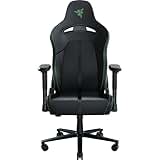 Secretlab Titan Evo 2022 Gaming Chair 🔥 Editor's Pick | $449.00 | ★ 4.5 (12,000) | View → |
| 6 |  Steam Deck OLED 512GB ✨ Staff Fave | $549.00 | ★ 4.7 (8,900) | View → |
| 7 | 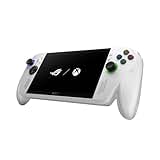 ASUS ROG Ally X Gaming Handheld 🤯 Overkill Mode | $799.99 | ★ 4.5 (4,100) | View → |
| 8 |  FlexiSpot E7 Pro Electric Standing Desk | $499.00 | ★ 4.6 (12,638) | View → |
| 9 |  LG UltraGear 27" 4K 144Hz Nano IPS | $649.99 | ★ 4.5 (6,200) | View → |
| 10 | 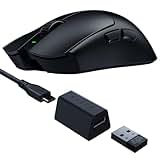 Razer Viper V3 Pro Wireless Esports Mouse 🎮 Gamer Approved | $159.99 | ★ 4.6 (4,200) | View → |
| 11 |  Corsair K65 Plus Wireless 75% Keyboard 🔥 Editor's Pick | $119.99 | ★ 4.5 (3,100) | View → |
| 12 |  ASUS ROG Cetra II Core Wired Gaming Earbuds 💰 Best Value | $39.99 | ★ 4.4 (5,600) | View → |
| 13 |  Herman Miller Aeron Chair (Remastered) 🤯 Overkill Mode | $1795.00 | ★ 4.7 (4,800) | View → |
| 14 |  Razer Basilisk V3 X Hyperspeed 🚀 Community Fave | $48.99 | ★ 4.4 (2,360) | View → |
| 15 |  Logitech G413 TKL SE 🚀 Community Fave | $69.99 | ★ 4.6 (1,045) | View → |
Filter by Price
Turns your Steam Deck into a desktop in 30 seconds: HDMI 2.0 (4K/60Hz), 3x USB-A, USB-C 100W passthrough charging, Gigabit Ethernet. Also works as a universal USB-C hub for any laptop. More useful than its price suggests.
✓ Pros
- ✓ 4K HDMI output
- ✓ 100W passthrough charge
- ✓ Works with any USB-C laptop
✗ Cons
- ✗ No DisplayPort
- ✗ HDMI limited to 60Hz at 4K
Razer Green switches, per-key RGB Chroma, aluminum top plate, and a compact tenkeyless layout. The keyboard you buy when you're done messing around with budget boards.
✓ Pros
- ✓ Premium Razer Green switches
- ✓ Per-key RGB
- ✓ Aluminum top plate
✗ Cons
- ✗ Razer Greens are loud
- ✗ No wireless option in TKL
60g, HERO 2 sensor with 32,000 DPI, 95hr battery. The mouse used by more professional esports players than any other. If you play competitively, this is the endgame.
✓ Pros
- ✓ Used by pro esports players
- ✓ Featherweight 60g
- ✓ HERO 2 top-tier sensor
✗ Cons
- ✗ Premium price
- ✗ No RGB (intentional — saves weight)
Dual wireless connection (2.4GHz + Bluetooth), hot-swap infinite battery, and active noise cancellation. The first gaming headset that has absolutely no compromises.
✓ Pros
- ✓ Hot-swap battery (never runs out)
- ✓ Dual wireless
- ✓ ANC in a gaming headset
✗ Cons
- ✗ Very expensive
- ✗ Base station is bulky
NEO Hybrid leatherette or SoftWeave Plus fabric, magnetic memory foam head pillow, integrated lumbar adjustment, and 4-way armrests. The gaming chair that office chairs are embarrassed by.
✓ Pros
- ✓ Best lumbar in any chair
- ✓ Magnetic memory foam head pillow
- ✓ Built to last 5+ years
✗ Cons
- ✗ Takes 1+ week to break in
- ✗ Pricey
Steam Deck OLED 512GB
7.4" HDR OLED screen, 90Hz, AMD RDNA 2, runs your full Steam library in your hands. The PC gaming handheld that proved PC gaming handhelds are the future.
✓ Pros
- ✓ OLED 90Hz HDR screen
- ✓ Runs full Steam library
- ✓ 8–12hr battery (OLED model)
✗ Cons
- ✗ Heavy at 640g
- ✗ Desktop mode needs practice
AMD Ryzen Z1 Extreme, 1080p 120Hz display, 24GB RAM, 1TB SSD. The Windows gaming handheld that runs anything — including games Valve hasn't verified yet.
✓ Pros
- ✓ Full Windows = any game
- ✓ 24GB RAM (vs 16 in base Ally)
- ✓ ROG XG Mobile eGPU compatible
✗ Cons
- ✗ Runs hot under full load
- ✗ Premium price
Dual-motor 355 lbs weight capacity, 4 memory presets, anti-collision tech, and a 58"×28" desktop. Stand all day without back pain. The investment your spine begs you to make.
✓ Pros
- ✓ Dual motor (very stable)
- ✓ 355 lbs capacity
- ✓ 4 memory height presets
✗ Cons
- ✗ Assembly takes 2 hours
- ✗ Heavy to ship
True 4K at 144Hz with G-Sync Ultimate and HDMI 2.1 for PS5/Xbox Series X. Nano IPS panel with near-perfect color coverage. The monitor that bridges work and play perfectly.
✓ Pros
- ✓ 4K 144Hz (best of both)
- ✓ HDMI 2.1 for consoles
- ✓ G-Sync Ultimate
✗ Cons
- ✗ Very expensive
- ✗ Needs powerful GPU for 4K144fps gaming
82g, Focus Pro 35K DPI optical sensor, HyperSpeed wireless, 70hr battery. The choice of FPS champions who need speed, precision, and nothing getting in the way.
✓ Pros
- ✓ 35K DPI Focus Pro sensor
- ✓ 70hr battery
- ✓ Used by pro FPS players
✗ Cons
- ✗ No RGB (for weight savings)
- ✗ Not for heavy-mouse fans
75% layout, dual wireless (2.4GHz + Bluetooth), hot-swap switches, gasket mount for sound dampening, per-key iCUE RGB. The enthusiast gaming keyboard that doesn't require being wired.
✓ Pros
- ✓ Hot-swap switches
- ✓ Gasket mount dampening
- ✓ Dual wireless 2.4GHz + BT
✗ Cons
- ✗ 75% layout learning curve
- ✗ iCUE software required for full RGB
10mm drivers, detachable flexible mic, 3.5mm + USB-C + USB-A adapters, RGB logo. Gaming earbuds that don't look ridiculous on a plane but sound incredible in a game.
✓ Pros
- ✓ In-ear gaming detail
- ✓ All adapters included
- ✓ Detachable mic
✗ Cons
- ✗ Wired only
- ✗ Mic quality is acceptable, not exceptional
The chair that the most successful offices in the world chose for a reason. 8Z Pellicle mesh, PostureFit SL lumbar, forward tilt, and a 12-year warranty. The last chair you'll ever buy.
✓ Pros
- ✓ 12-year warranty
- ✓ PostureFit SL lumbar science
- ✓ Breathable mesh never gets hot
✗ Cons
- ✗ Extremely expensive
- ✗ Requires dealer sizing (A/B/C)
Razer Basilisk V3 X Hyperspeed
The community recommends the Razer Basilisk V3 X HyperSpeed Customizable Wireless Gaming Mouse due to its mechanical switches.
✓ Pros
- ✓ supports wireless gaming
- ✓ customizable
✗ Cons
- ✗ none mentioned in the text
Logitech G413 TKL SE
The community recommends this keyboard due to its compact design and backlit feature.
✓ Pros
- ✓ Compact design
- ✓ Backlit feature
✗ Cons
- ✗ Newer to our list — less long-term data
Buying Guide — What to Look For
Chair > desk > peripherals — in that order
You sit in your chair for 6-10 hours a day. It is the most important piece of equipment in your setup. Spend money here first. A $50 gaming chair from Amazon will hurt you. The Secretlab Titan is worth every dollar.
Wireless is better now — stop being afraid
Modern wireless gaming mice (G Pro X Superlight 2, Razer Viper V3 Pro) have 2.4GHz latency indistinguishable from wired and 80-100hr battery. The 'wired is better' era is over.
The monitor is the most underrated upgrade
Every hardware upgrade gets more visible when paired with a good monitor. A 165Hz 1440p display makes every mouse click feel more responsive. Invest in your display before adding a third RGB strip.
Handhelds have changed gaming
The Steam Deck OLED and ROG Ally X have proven that PC gaming belongs in your hands. If you travel often or have a TV in your bedroom, a gaming handheld may be a more practical purchase than a new GPU.
Head-to-Head
the matchups readers actually ask aboutSteam Deck OLED vs ASUS ROG Ally X
The Deck OLED is the better product; the Ally X is the better computer. SteamOS means the Deck just works — suspend/resume, battery life, a store curated for the hardware. The Ally X's Windows runs Game Pass, every launcher, and mods natively, with more raw power, at the cost of constant fiddling. People who want a console: Deck. People who enjoy tinkering and own a Game Pass sub: Ally X.
Full side-by-side comparison →Logitech G Pro X Superlight 2 vs Razer Viper V3 Pro
The two mice at the top of every pro-play spreadsheet. The Viper V3 Pro has the newer sensor and 8K polling; the Superlight 2 has the shape more hands already know and Logitech's flawless wireless track record. Measured performance differences are smaller than your aim variance on a bad night. Buy whichever shape matches your grip — that's the entire decision at this tier.
Full side-by-side comparison →Frequently Asked Questions
Is a Secretlab chair really worth $500 over a $150 Amazon gaming chair?
The honest answer: the $150 chair feels 80% as good for the first three months. The difference is years two through five — foam that doesn't pancake, hardware that doesn't wobble, a warranty that actually gets honored. If you sit 8+ hours a day, the per-hour math strongly favors buying once. Casual use, the cheap chair is fine.
Steam Deck or ROG Ally?
Steam Deck OLED for most people — better screen, better battery, SteamOS just works, and the used market holds value. The Ally wins on raw performance and runs Windows (Game Pass natively), at the cost of battery life and software jank. If you mostly play your Steam library on a couch, it's the Deck.
What order should I upgrade my setup in?
Chair, monitor, mouse, keyboard, audio, then desk — roughly in order of hours-of-contact and impact. The chair affects every hour you sit; the RGB desk pad affects nothing. The most common regret pattern we see is people doing it in exactly the reverse order.
Our Verdict
The dream gaming setup starts with the Secretlab chair, adds the Logitech G Pro X mouse, the Razer BlackWidow TKL keyboard, and a 1440p 165Hz monitor. From there, it's the standing desk and the Steam Deck. Build it piece by piece — everything on this list holds its value better than almost any other tech category.
Was this helpful? Share it.
← Back to all picksGet the picks before everyone else
One short email when we publish new picks or spot a real deal. No spam, unsubscribe anytime.